Streamlining Professional Presentations with the Franko Google Slide Template
In the modern professional landscape, the ability to communicate ideas clearly and visually is as critical as the ideas themselves. Whether you are a marketer pitching a new campaign, an educator structuring a semester curriculum, or an entrepreneur seeking investment, your presentation deck serves as the visual backbone of your narrative. However, starting from a blank canvas often leads to wasted hours on formatting rather than content creation. This is where a robust, pre-designed structure like the Franko - Google Slide Template becomes an essential asset in your digital toolkit. It is not merely a collection of pretty slides; it is a workflow accelerator designed to integrate seamlessly into your existing creative and business processes.
Integrating Design Efficiency into Your Workflow
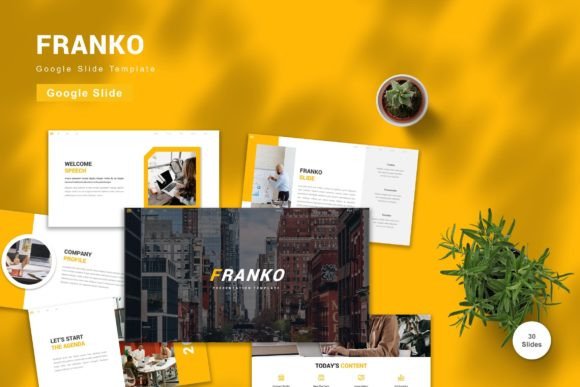
The primary value of adopting a template like Franko lies in its ability to shift your focus from design mechanics to strategic messaging. When you download the Franko - Google Slide Template, you are acquiring a system that has already solved common design problems. The package includes 150 total slides across five premade color schemes, providing a substantial library of layouts for various use cases. This breadth ensures that you are not forced to cram complex data into an inappropriate layout or stretch simple points to fill space.
For professionals who manage multiple projects simultaneously, consistency is key to brand integrity. The Franko template utilizes vector-based elements and master slides, which means that changes made to the master layout propagate throughout the entire deck. This feature is crucial for maintaining quality control. If your company updates its brand colors or font preferences, you do not need to manually adjust hundreds of individual text boxes or shapes. Instead, you modify the master slide, and the update is instantaneous across all 30 useful slide types included in the set. This level of automation reduces the risk of human error and ensures a polished, professional appearance every time.
Preparation and Setup: Laying the Groundwork
Effective implementation begins before you even open the file. The first step in utilizing the Franko template is reviewing the included readme information. While it may be tempting to skip this step, the readme often contains specific instructions regarding font installation and aspect ratio settings. The template recommends free web fonts, which ensures that your presentation remains accessible and consistent regardless of the device used to view it. By sticking to recommended fonts, you avoid the common pitfall of "font substitution," where a presentation looks perfect on your computer but appears broken on a client’s screen due to missing typefaces.
Once you have familiarized yourself with the documentation, select one of the five premade colors that best aligns with your project’s tone or brand identity. This decision sets the visual mood for your entire presentation. Because the elements are fully editable, you can further customize these colors to match exact hex codes if necessary. However, starting with a premade palette provides a psychologically balanced foundation, ensuring that contrast ratios are legible and aesthetically pleasing. This initial setup phase is critical for establishing a cohesive visual language that supports your message rather than distracting from it.
Execution: Building Content with Drag-and-Drop Ease
With the framework established, the actual creation process becomes a matter of assembly rather than construction. The Franko template is designed for ease of use, featuring drag-and-drop functionality for images and graphics. This is particularly beneficial for users who may not have advanced graphic design skills. You simply replace placeholder images with your own assets, input your content, and adjust the layout as needed. The vector-based nature of the graphics ensures that they remain crisp and clear at any size, eliminating pixelation issues that often plague raster-based templates.
Consider a scenario where you are preparing a quarterly business review. You need to present financial data, team achievements, and future projections. Using the 30 useful slides provided, you can select specific layouts for each section: a timeline slide for historical context, a chart-ready slide for financial metrics, and a team profile slide for highlighting key contributors. The animated slides included in the package add a layer of engagement, allowing you to reveal information progressively. This controlled release of information helps keep the audience focused on the current point rather than reading ahead, thereby enhancing retention and understanding.
Moreover, the template’s compatibility with Google Slides means that collaboration is effortless. Multiple team members can work on the same deck simultaneously, leaving comments and making edits in real-time. This cloud-based accessibility removes the friction of version control, where multiple files named "Final_v2" and "Final_v3" circulate via email. With Franko, there is only one source of truth, updated live by all stakeholders. This integration into collaborative workflows significantly reduces turnaround time and improves the overall quality of the final output through immediate peer review.
Post-Production and Long-Term Utility
After the presentation is delivered, the value of the Franko template does not end. The files serve as a reusable archive for future projects. Because the template is structured around master slides and modular components, you can easily extract specific slides to create new decks for different purposes. For instance, a slide designed for a product launch can be repurposed for a training manual or a client proposal with minimal adjustments. This modularity encourages the development of a personal or corporate library of high-quality visual assets, reducing the need to start from scratch in the future.
It is important to note that preview images are not included in the download, which emphasizes the need for users to engage with the actual file to understand its full potential. This approach ensures that you are evaluating the tool based on its functional capabilities rather than static marketing materials. As you use the template over time, you will discover nuances in its design that cater to specific industries or presentation styles. Educators might find the clean, distraction-free layouts ideal for lecture notes, while marketers might leverage the bold, animated elements for high-energy pitches.
Maximizing Impact Through Strategic Customization
To truly leverage the Franko - Google Slide Template, consider how it interacts with other tools in your ecosystem. For example, you can export charts from Excel or Google Sheets and paste them directly into the vector-based placeholders, maintaining editability within the slide environment. This seamless integration between data analysis tools and presentation software streamlines the reporting process. Additionally, because the template uses standard widescreen dimensions, it is optimized for modern displays, projectors, and video conferencing platforms, ensuring that your content looks professional whether presented in person or virtually.
Quality control remains a vital aspect of using any template. While the design work is done for you, the responsibility for content clarity and accuracy rests with the user. Use the template’s structure to enforce discipline in your messaging. Limit text on each slide, utilize bullet points effectively, and ensure that images are high-resolution and relevant. The animated slides should be used judiciously to highlight key points rather than as a gimmick. Overuse of animation can detract from the professionalism of the presentation, so aim for subtlety and purpose in your motion design choices.
Ultimately, the Franko template is more than a design resource; it is a productivity tool that respects your time and enhances your professional image. By providing a flexible, editable, and visually coherent foundation, it allows you to focus on what matters most: communicating your ideas with clarity and impact. Whether you are a freelancer managing client expectations, a small business owner pitching to investors, or a corporate leader driving strategic initiatives, integrating this template into your workflow offers a tangible return on investment through saved time and improved presentation quality. Get it now and transform the way you prepare, execute, and deliver your most important messages.