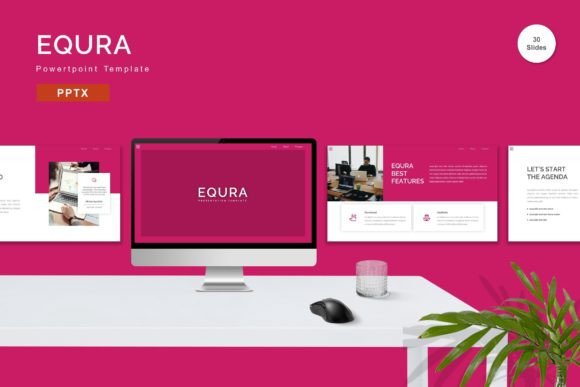
Equra PowerPoint Template for All Needs
Creating a presentation that captures attention and communicates your message clearly can be a daunting task, especially when you are starting from a blank slide. Whether you are an entrepreneur pitching to investors, a teacher preparing a lesson plan, or a freelancer showcasing your portfolio, the visual quality of your slides matters. This is where the Equra PowerPoint Template becomes an essential tool in your digital toolkit. Designed with versatility and ease of use in mind, this template offers a comprehensive solution for anyone looking to elevate their presentations without needing advanced design skills.
Why Choose Equra for Your Next Presentation?
The primary appeal of the Equra PowerPoint Template lies in its balance between professional aesthetics and user-friendly functionality. Many users struggle with templates that are either too rigid to customize or so complex that they require hours of tweaking. Equra solves this by providing a structure that is both robust and flexible. It allows you to focus on your content rather than fighting with formatting issues.
At its core, this template is built to handle a wide variety of scenarios. From formal business reports to creative personal projects, the design language is clean and modern. The layout ensures that your data, images, and text are presented in a way that guides the audience's eye naturally. By using a vector-based approach, the graphics remain crisp and clear regardless of how much you zoom or resize them, ensuring your presentation looks sharp on any screen.
A Comprehensive Suite of Slides and Colors
One of the standout features of the Equra collection is the sheer volume of options it provides. With 150 total slides, you have access to a vast library of layouts tailored for different types of information. However, quantity does not come at the expense of quality. Within these 150 slides, there are 30 useful, distinct slide designs that cover the most common presentation needs, such as timelines, team introductions, financial charts, and comparison tables.
Visual consistency is crucial for branding, which is why the template includes 5 premade color schemes. These colors are professionally curated to ensure readability and visual harmony. If your brand requires specific hues, the good news is that all elements are easily editable. You can change the color palette to match your company logo or personal style with just a few clicks. This flexibility means you don't have to compromise on your brand identity while enjoying the benefits of a pre-designed layout.
Effortless Customization for Every User
Getting started with the Equra PowerPoint Template is designed to be intuitive, even for beginners. The template utilizes a master slide system, which acts as the blueprint for your entire presentation. When you make changes to the master slide—such as updating a font or adjusting a background color—those changes automatically apply to all relevant slides. This saves a tremendous amount of time compared to editing each slide individually.
The "drag and drop" functionality makes inserting your own content seamless. You can replace placeholder images with your own photos or graphics instantly. The recommended free web fonts included in the package ensure that your typography looks modern and loads correctly across different devices. Furthermore, the template comes with an animated slide feature, adding a dynamic element to your transitions without requiring complex animation settings. This helps keep your audience engaged as you move through your key points.
Practical Use Cases Across Different Fields
The versatility of the Equra PowerPoint Template makes it suitable for a diverse range of users and industries. Here are a few realistic examples of how it can be applied:
- Business Professionals: Entrepreneurs and marketers can use the structured layouts to create compelling pitch decks. The clean charts and data visualization slides help present financial projections and market analysis clearly.
- Educators and Trainers: Teachers can utilize the timeline and process slides to break down complex topics into digestible steps. The ability to insert custom images makes it perfect for history lessons, science demonstrations, or corporate training sessions.
- Creative Freelancers: Designers and photographers can adapt the gallery-style slides to showcase their portfolios. The minimalist aesthetic ensures that the work takes center stage without distracting backgrounds.
- Small Business Owners: For those managing small teams, the template is ideal for quarterly reviews, project updates, and strategic planning meetings. The consistent look lends credibility to internal communications.
What Is Included in Your Download?
When you get the Equra PowerPoint Template, you receive a complete package designed to get you up and running immediately. The download includes 5 PPTX files, each corresponding to one of the five premade color variations. This organization allows you to quickly test different looks before settling on the final version for your presentation.
All files are optimized for widescreen displays, which is the standard for modern projectors and monitors. Additionally, a detailed Readme file is included to guide you through the setup process, explaining how to edit the master slides, change colors, and access the various features. It is important to note that while the template provides high-quality placeholders, the preview images shown in marketing materials are not included in the actual files; you will need to supply your own content to bring the slides to life.
Key Considerations Before You Begin
While the Equra PowerPoint Template is highly versatile, there are a few things to keep in mind to maximize its potential. First, since the design relies heavily on vector graphics, ensure you are using a compatible version of PowerPoint that supports these features for the best results. Second, while the included fonts are free and web-ready, always check if your organization has specific typography guidelines that might override the default choices.
Another consideration is the scope of your content. With 150 slides available, it can be tempting to include every single one. However, effective presentations are often concise. We recommend selecting only the slides that directly support your narrative to avoid overwhelming your audience. Finally, remember that while the template handles the design, the success of the presentation still depends on the clarity of your message and the relevance of your data.
Transforming Your Presentations Today
In a world where visual communication is key, having a reliable and professional template can make all the difference. The Equra PowerPoint Template offers a powerful combination of design excellence and practical utility. Whether you are refining a business strategy or sharing a personal story, this tool provides the foundation you need to present with confidence. By simplifying the design process, it frees you to focus on what truly matters: connecting with your audience and delivering your message effectively.